Skip to content

10 Tips for Choosing Ergonomic Keyboard Trays

A desk can look tidy while quietly forcing your wrists upward for eight hours. Ergonomic keyboard trays offer a practical way to adjust keyboard height, depth, and angle. Yet choosing the first adjustable model rarely solves the whole problem.

The EU-OSHA OSH Pulse survey reported that three in five European workers experienced musculoskeletal complaints in 2022. The U.S. Bureau of Labor Statistics also continues to identify sprains, strains, and related injuries as major causes of days away from work. These figures do not prove that a keyboard tray prevents injury. They show why small workstation decisions deserve careful attention.

Guidance from OSHA and NIOSH emphasizes neutral wrists, relaxed shoulders, suitable work-surface height, and frequently used equipment within easy reach. A well-selected tray should support those principles. It should not create new pressure beneath the desk or restrict leg movement.

Fit matters more than appearance.

A useful tray keeps the keyboard close to your body. Its platform should remain stable when you type quickly. Its adjustment range should match your chair, desk, and monitor height. That sounds simple, but real desks often have drawers, crossbars, or limited knee clearance.

This guide presents 10 practical tips for choosing ergonomic keyboard trays. It considers installation, movement, materials, weight capacity, adjustment quality, and long-term comfort. Some recommendations depend on body size and work habits. That limitation is worth admitting. No product replaces regular movement, proper chair adjustment, or professional ergonomic assessment when discomfort persists.
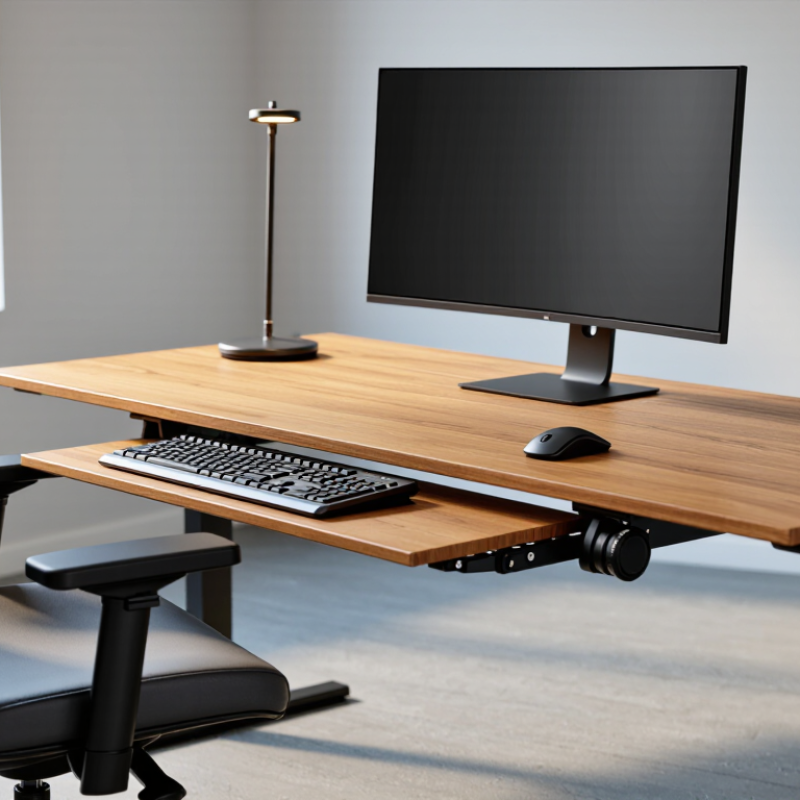
10 Tips for Choosing Ergonomic Keyboard Trays

Define the Ergonomic Goals of a Keyboard Tray

An ergonomic keyboard tray should solve a measurable problem, not decorate a desk. Define the goal before comparing materials, prices, or adjustment features. In workstation assessments, I look for three outcomes: neutral wrists, relaxed shoulders, and enough legroom. The tray is useful only if it supports those outcomes consistently.

OSHA’s Computer Workstations eTool recommends keeping wrists straight, elbows close to the body, and shoulders relaxed. These cues create practical tray requirements: height adjustment, stable movement, and enough depth for the keyboard. EU-OSHA’s OSH Pulse 2022 reported that three in five EU workers experienced musculoskeletal complaints. That figure makes comfort a risk-control question, not a decoration choice. Measure seated elbow height. Then check whether the tray stays level during typing.

Do not chase maximum adjustability. More mechanisms can create wobble, noise, and poor daily use. A tray that forces the mouse too far away fails its purpose. Small details matter. Test the reach with your forearms supported and feet flat. I have seen a useful tray installed too low, making the user lift the shoulders. That mistake is easy to miss. Recheck after a full work session, because a five-minute test can flatter almost any design. The goal is repeatable posture, not a perfect-looking setup.

Measure Your Workspace and Identify Installation Limits

Choosing an ergonomic keyboard tray starts with the space beneath your desk, not the tray itself. Measure the desktop width, depth, and thickness with a tape measure. Record the clear space from the front edge to your knees. A tray may fit the surface but still strike your legs.

Look underneath the desk carefully. Check for drawers, support rails, cables, crossbars, and uneven panels. These obstacles can block mounting brackets or reduce legroom. Leave enough clearance for your thighs and chair movement. A practical target is several centimeters between the tray and your knees. Small differences matter.

Measure twice.

Also test the tray’s reach before drilling. Sit in your usual working position and mark where your elbows rest naturally. The keyboard should stay close, allowing relaxed shoulders and nearly level wrists. If the desk has adjustable height, check the tray at both sitting and standing positions. Watch for collisions with the chair arms or nearby equipment.

Installation limits deserve honest attention. Confirm the desk can support the hardware, especially with a thin or hollow desktop. Use the supplied load guidance, but treat it as a limit, not a challenge. I have seen careful measurements fail because a hidden metal rail was overlooked. A cardboard template can reveal that problem early. It may feel excessive, yet replacing misplaced hardware is far more frustrating. Leave room for cable movement, too, because a tight cable can pull the tray out of alignment.

Compare Tray Size, Height, Tilt, and Adjustment Features

10 Tips for Choosing Ergonomic Keyboard Trays

Tray size should match your keyboard, mouse, and natural hand movement. Measure the equipment first. A narrow platform can force your mouse wrist onto the desk edge. A deep platform may reduce legroom. Leave several centimeters for relaxed repositioning, not decoration.

Height matters more than appearance. OSHA’s Computer Workstations guidance recommends keeping the keyboard near elbow height, with shoulders relaxed and wrists reasonably straight. In practice, adjust the tray until your forearms feel level. Then check whether your knees still have clearance. A 2023 U.S. Bureau of Labor Statistics report recorded 946,900 cases involving days away from work because of musculoskeletal disorders. A tray cannot prevent every injury, but poor positioning adds avoidable strain.

Tilt deserves careful comparison. A slight negative tilt can support a straighter wrist, especially when the tray sits above elbow level. Positive tilt may feel familiar, yet it can increase extension. Look for height, tilt, depth, and lateral adjustments that lock securely. Smooth controls are useful. Loose controls are not. Test the tray while typing, not while standing beside the desk. I once chose a wide model that blocked my knees, so size alone was a poor decision. Recheck the setup after a week; comfort can change with workload, posture, and fatigue.

Evaluate Materials, Stability, Comfort, and Weight Capacity

A good ergonomic keyboard tray must do more than slide beneath a desk. Its materials affect flex, noise, and long-term reliability. Steel brackets usually resist twisting, while reinforced polymers can reduce weight. Thin plastic may crack near screw holes. Check those areas carefully.

Stability matters during fast typing. I test a tray by pressing its corners and pulling the platform outward. Excessive movement can shift the wrists repeatedly. OSHA’s Computer Workstations eTool recommends keeping wrists straight and aligning the keyboard near elbow height. NIOSH guidance also stresses adjustability and neutral postures. The U.S. Bureau of Labor Statistics recorded 23,730 work-related carpal tunnel cases involving days away from work in 2022. That figure is not keyboard-specific, but it shows why small posture changes deserve attention.

Comfort depends on height, tilt, edge shape, and clearance. A padded front edge can feel pleasant, yet it may press against the forearms when the tray is too high. Measure your seated elbow height first. Then check whether your knees clear the mechanism. Weight capacity needs equal care. Add the keyboard, mouse, wrist rest, and any personal pressure during use. I prefer a capacity at least twice that combined load; this is my practical rule, not a universal standard. Some published ratings also omit dynamic force. That omission deserves skepticism.

Choose a Tray That Fits Your Desk, Chair, and Daily Work Habits

10 Tips for Choosing Ergonomic Keyboard Trays

Choose a tray that fits your desk, chair, and daily work habits. Measure the desk underside, knee space, and chair armrests before buying. Look for adjustable height, tilt, and side-to-side movement. The keyboard should sit near elbow level, with shoulders relaxed and wrists straight. A low-profile tray helps preserve legroom. A wide platform supports both the keyboard and mouse without crowding. Check the locking mechanism, especially if you type forcefully. Smooth adjustment matters when work changes during the day.

According to OSHA workstation guidance, neutral wrist and elbow positions can reduce unnecessary strain during computer work. EU-OSHA’s ESENER findings report that about three in five European workers experience musculoskeletal problems. That figure is broad, but it shows why small setup details deserve attention. I once chose a tray based only on its sliding range. It moved well, yet blocked my knees. Measure twice.

Match the tray to your routine. Heavy spreadsheet users may need firm support and generous mouse space. Frequent switching between sitting and standing requires quick, stable adjustments. Remote workers should consider cable clearance and a tray that does not damage thin desktops. Test the tray with your actual chair, not a showroom chair. Leave about two to three fingers of clearance above your thighs. A perfect angle on paper may feel awkward after an hour. Recheck your posture after several workdays, because habits often defeat good equipment.